Inbound Mail Now Shows Whether the Sender Is Who They Say
euromail now checks every email it receives for you three ways instead of one, and shows which server sent it and where that server is. The dashboard, your webhooks and agent mailboxes all tell you whether the sender could prove the address people actually read.
When an email arrives at your support address or an agent mailbox, you want to know first whether it really came from the sender it names. Until now euromail answered that with one check, SPF. SPF answers a narrower question than most people think.
SPF looks at the server that delivered the message and asks whether that server may send for the domain in the envelope address. The envelope address is hidden plumbing. People read the address in the From line, and SPF never looks at that one. Someone can send from their own domain, pass SPF for it, and put your bank's name in From. With only SPF to go on, that message looked as trustworthy as real mail.
Three checks instead of one#
We now also check every message we receive for you with DKIM and DMARC.
DKIM is a signature the sending domain adds to the message. If the signature verifies, the message came from that domain and nobody changed it along the way.
DMARC connects the other two checks to the From line. It passes only if SPF or DKIM succeeded for the domain people see in From, or for a subdomain of it. The domain can also use DMARC to say what should happen to mail that fails.
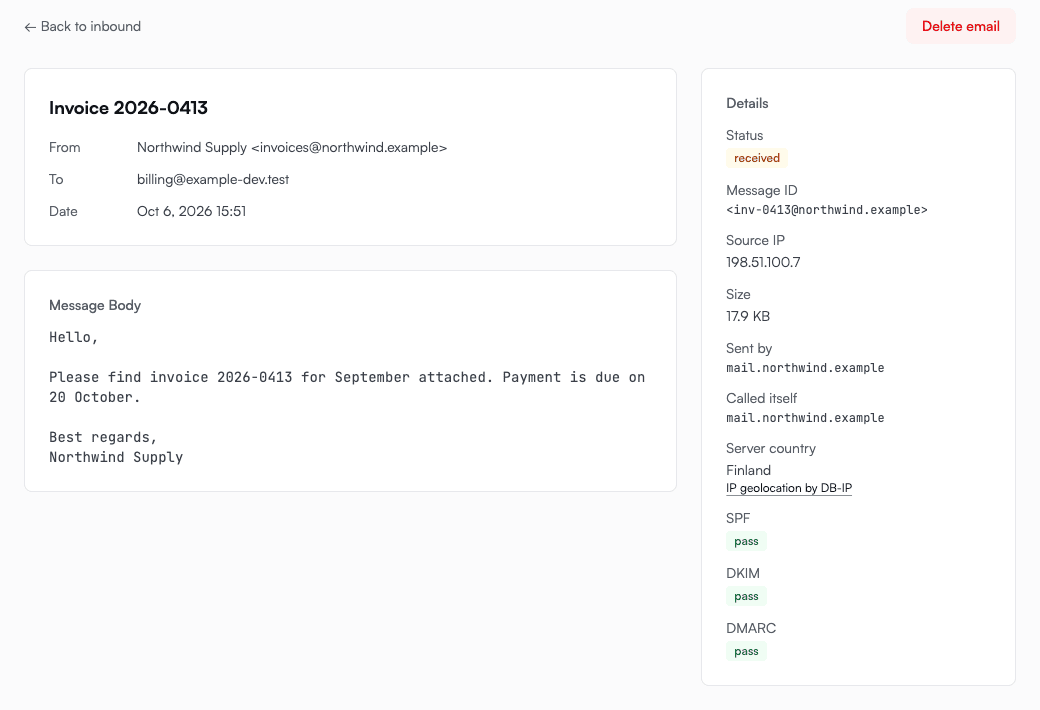
The inbound page in the dashboard shows all three results for each message. This is a genuine invoice from a company that has everything set up:
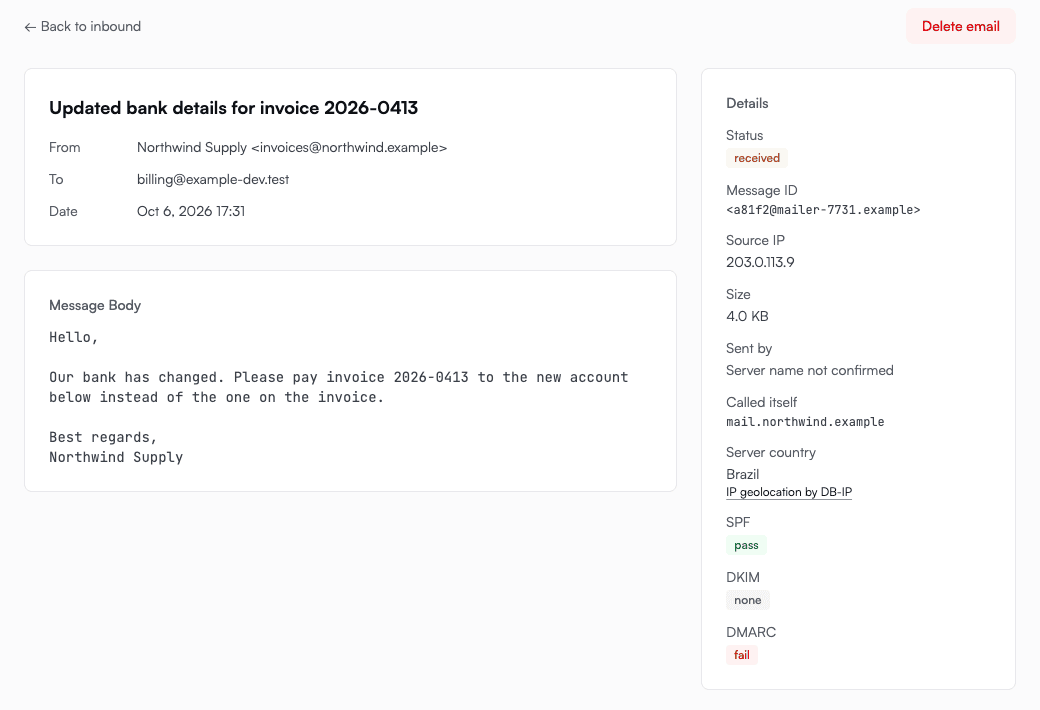
And this is the message we built the change for. The From line says the invoice is from the same company, but someone else's server sent it:
What the results mean#
- pass: the check succeeded.
- fail: the check ran and the message didn't meet it. A DMARC fail usually means the From line names a domain the sender doesn't control.
- none: the sender's domain hasn't set this check up. Plenty of small senders haven't, and it doesn't mean anything is wrong.
- temperror: the sender's DNS didn't answer in time. We still deliver the message. Your mail shouldn't wait on someone else's slow server.
- softfail, neutral and permerror: weaker or broken results. The inbound email guide lists them all.
- Not checked: the message arrived before this change. We didn't go back and check old mail, because today's DNS records could give answers that weren't true when the message arrived.
Where it came from#
The three checks tell you whether the sender proved it owns its domain. Now each message also tells you where it came from.
- Sent by is the name of the server that delivered the message, shown only if that name checks out in both directions. Anyone can give their server a flattering name, so we look the name up and keep it only if it points back to the same server. If the name belongs to a mail service we recognise, such as Google or Microsoft, we show the service as well.
- Called itself is the name the server gave when it connected. That's the server's claim, and the page shows it as a claim.
- Server country is where DB-IP places the server's address. It tells you where the server is, which may not be where the person who wrote the message is. The country lookup runs on our own servers, so the address is never sent to DB-IP.
If the name lookup doesn't finish in time, the page says "Could not check" so it doesn't look like the sender did something wrong.
The forged invoice above shows all of it at once. It calls itself Northwind's mail server, that name doesn't check out, and the server is in Brazil.
In agent mailboxes too#
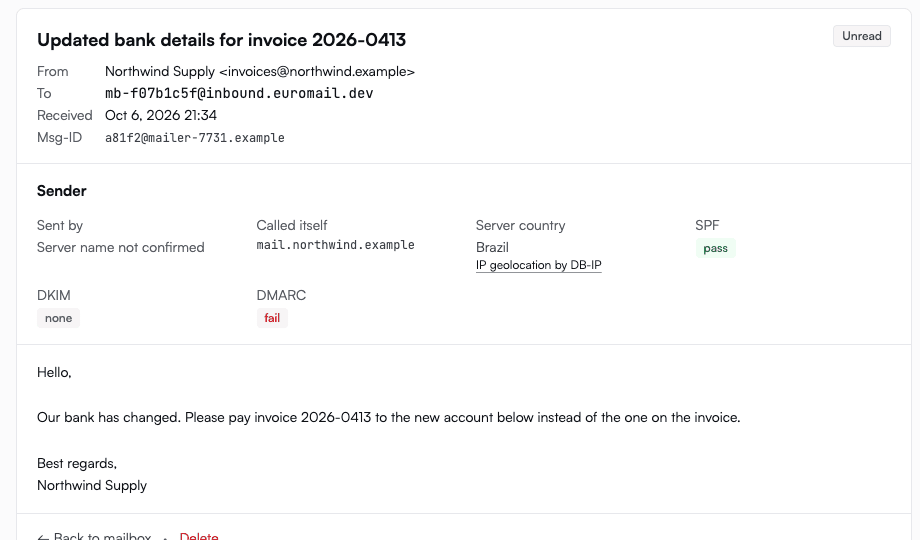
If an AI agent reads your mail through an agent mailbox, every message it receives carries the same checks, and the dashboard shows them on each message. In a conversation, any message that failed DMARC is marked "Sender not verified", so a forged message stands out before anyone acts on it.
In your webhooks#
If you get inbound mail through a webhook, each message carries the same three results, along with the server details from the dashboard:
"authentication": { "spf": "pass", "dkim": "none", "dmarc": "fail" },
"sender": { "hostname_status": "none", "helo": "mail.northwind.example", "country": "BR", "country_name": "Brazil" }
You can use them to hold a message for review before an automated workflow acts on it, or to put a warning next to it in your own tool.
This work also turned up a smaller fix. Some older mail systems still send text in encodings from before Unicode, and we used to clean those bytes up before storing the message. That cleanup would have broken the DKIM signature on genuine mail, so we now store every message exactly as it arrived.
The inbound email guide explains each of these fields in detail.
Start sending GDPR-compliant email today
Create a free account and send your first email in minutes. Email storage and AI processing in Finland, with a DPA on every plan.